Plandroid - Graphical Air Conditioning Design and Quoting Software
Plandroid Help Documentation
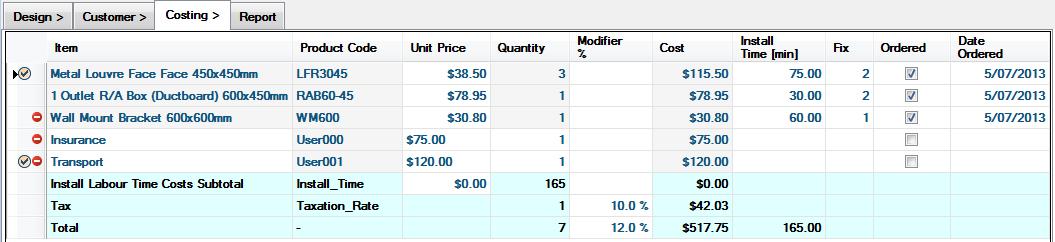
In the Costing page, there are two types of cost items. There are the cost items for the parts that you have used in your design, and which are automatically added to the costing take-off list by the program. Plus there are other line-items, (user cost items), that you can manually add yourself to cover anything else that should be costed.
User Cost Items
You can add your own user cost items with the Add Cost Item menu button
( ). You can then proceed to edit any of that
item's properties, including its product code and manufacturer. Its cost will also be included in the total cost.
). You can then proceed to edit any of that
item's properties, including its product code and manufacturer. Its cost will also be included in the total cost.
 |
Any user cost items that you have added and edited can be added again to later designs. From the
Costing page context menu select Add User Cost Item. This gives you a list of the recently
edited user cost items which you can re-insert. Items that you always want to have included in the
costing table can be set to be added to every design with the context menu item Always Add This Item
( ).
).
If you have your own set of cost items that you wish to be able to add, you can add each of those
items to the Costing page, mark them as Always Add, and set each quantity to zero. When you want to
add the item to a new design, just enter the appropriate quantity you wish to have in its quantity column.
You can also use the Highlight Row toolbar button ( ) to highlight group headers or otherwise make a visual distinction between
groups of items that you have added.
) to highlight group headers or otherwise make a visual distinction between
groups of items that you have added.
Catalog Items
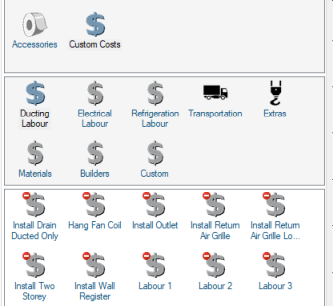
To have cost items automatically inserted by the program into the Costing take-off list, you need to select a catalog that contains parts representing those items and add them to the design canvas. Most often the parts are representations of actual physical objects, but a number of catalogs have parts that are simply representations of cost items, such as transportation or crane hire, for example. There is also a Custom Costs catalog, with a wide selection of cost items that you can rename and reprice yourself using the Parts context menu, to represent your own cost items. Simply load this catalog and add these items to the canvas, and they will be costed without having to add line-items to the Costing page.
 |
If you nonetheless think you require a customised catalog so you can add your own cost items, please contact technical support at support@plandroid.com.
Part Labour Costs
While not strictly a cost item, you can also specify labour costs that are associated with any part that you've added from a catalog. These can be given in currency or time values.
Go back to How do I?