Plandroid - Graphical Air Conditioning Design and Quoting Software
Plandroid Help Documentation
Sometimes you may wish to make a single zone in the Design page
which spans multiple rooms which do not contact each other. This can easily be done by selecting the zones you wish to join together
and using the Join Zones toolbar button ( ). (To select zones,
you need to be in the Design -> Loads tool tab, and the toolbar button will only become active when you have selected more than one zone).
This tool will link the discontinuous zones with corridors of zero width, as shown in the following image (with the joining corridor
highlighted):
). (To select zones,
you need to be in the Design -> Loads tool tab, and the toolbar button will only become active when you have selected more than one zone).
This tool will link the discontinuous zones with corridors of zero width, as shown in the following image (with the joining corridor
highlighted):
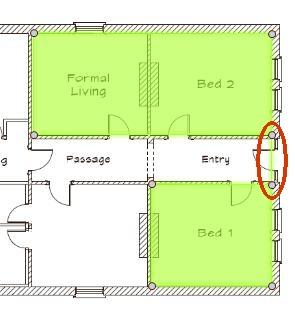 |
The joining corridor will only be visible when you mouse-over the zone.
Even if the joined zones have different loads or ceiling heights, the tool will automatically give the resulting zone the correct load and height so that the heat flow and airflow calculations remain unchanged. The zone name, colour, and continuous or switchable settings are all taken from whichever zone in the selection was created first.
If you use the Automatic Design toolbar button ( )
to automatically create a design, then the design engine will know what the
original zones were, and will place outlets so that each original zone will still have its own air supply. In this way
a "compound" zone remains different from one drawn as a single zone.
)
to automatically create a design, then the design engine will know what the
original zones were, and will place outlets so that each original zone will still have its own air supply. In this way
a "compound" zone remains different from one drawn as a single zone.
Go back to How do I?