Plandroid - Graphical Air Conditioning Design and Quoting Software
Plandroid Help Documentation
Plandroid works entirely in two dimensions, for simplicity. So how then do you draw parts that are vertical, such as vertical pipes? There are two approaches to this issue:
Drawn Lengths
A simple solution is to draw vertical parts horizontally in an area of the plan which makes it clear that those parts are not to be installed in that location. In this way the application can still calculate their lengths and cost them appropriately. The program will report the length of any user-drawn part in the status bar (in the bottom right hand corner) as you are drawing it, which makes it easy to draw them the correct "height".
Rise Points
Another solution is to create a dedicated rise (or drop) point. You can do this using the context menu item: Add Rise / Drop on the drawn part. This lets you add a vertical height which is added to the part's length. The point that has the height added to it is highlighted on your diagram with a circle, rings, or with a rectangular cross-section (for rigid ducts) as shown in the following figure:
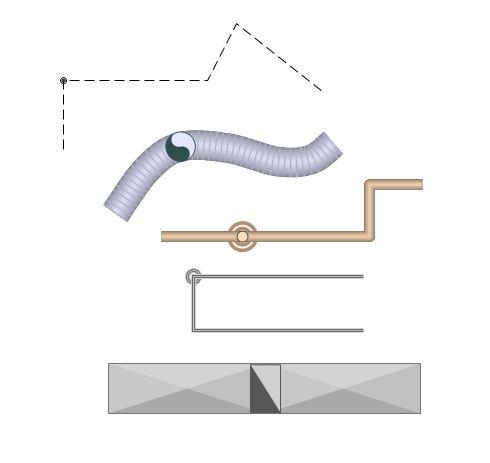 |
Hovering your mouse over the handle with the rise point will show you the rise or drop height. This method has the advantage that you don't need to draw any extra lengths. A rise has a positive height, while a drop is specified with a negative height. Note that flexible ducts no longer have length markers shown when they also have a rise point. A rise point can be removed by setting its height to zero, or by simply deleting the handle.
Note that when calculating air flows and material length costs for designs that include rises the program takes the extra rise lengths into account, and also includes the extra pressure losses due to the two elbow bends required. The elbow pressure losses are specified in the options settings, as is any extra material length required to account for the elbow bends.
Penetrations
Duct that is connected through a penetration also has a vertical rise length. The penetration depth is added to the length of duct required, and affects air flow pressure drop calculations in the same way as a rise point. The same options settings that affect risers are also used when calculating these effects for penetrations.
Go back to How do I?